

Navigating the world of stock images can be overwhelming, especially when budgets are tight. Fortunately, Adobe Stock offers a 30-day free trial that lets new users download up to 10 standard assets without any cost. This trial provides access to millions of premium images, videos, vectors, and illustrations—ideal for enhancing creative projects.
However, it’s crucial to understand the terms before diving in. The trial is completely free for 30 days and can be canceled anytime through your Adobe account. If you decide not to continue after the trial period ends, you won’t be charged and you’ll still keep any downloaded assets.

Key Takeaways
- Free Trial Offer: Adobe Stock provides a 30-day free trial that allows new users to download up to 10 standard assets at no cost, giving access to millions of premium images, videos, vectors, and illustrations.
- Eligibility Criteria: The free trial is available worldwide for administrators of Creative Cloud for teams (CCT) accounts without an existing Adobe Stock subscription. Participants must be 18 years or older and not in embargoed countries.
- Sign-Up Process: Sign up by visiting the Adobe Stock Free Trial Page, creating an Adobe ID if necessary, and accessing the 10 standard assets during the trial period.
- Asset Exploration: During the trial, users can explore diverse high-quality assets including photos, vectors, videos, templates, 3D models, and audio tracks to enhance their creative projects.
- Integration with Creative Cloud: Adobe Stock integrates seamlessly with Creative Cloud apps like Photoshop and Illustrator, allowing easy access to licensed assets directly within these applications.
- Managing Your Account: Monitor asset downloads through the “Plans” section on the Adobe Stock website. Keep account details updated to ensure uninterrupted service.
Eligibility for Adobe Stock Free Trial
The eligibility criteria for the Adobe Stock free trial determine who can access this offer and what restrictions apply.
Who Can Sign Up?
Administrators of Creative Cloud for teams (CCT) accounts without an existing Adobe Stock subscription can sign up. This offer is available worldwide, allowing many creative professionals to benefit from it.
- Age Requirement: Participants must be 18 years or older.
- Geographic Restrictions: Individuals in embargoed countries or those subject to U.S. or local export restrictions cannot participate.
- Trial Period: The 10 free asset licenses need downloading within 30 days of issuance; unused downloads expire at the end of the trial.
- Subscription Requirements: Each CCT account is limited to 10 standard asset licenses during the trial.
- Additional Terms: Availability depends on the participant’s location, with possible additional terms and conditions.
How to Sign Up for Adobe Stock Free Trial
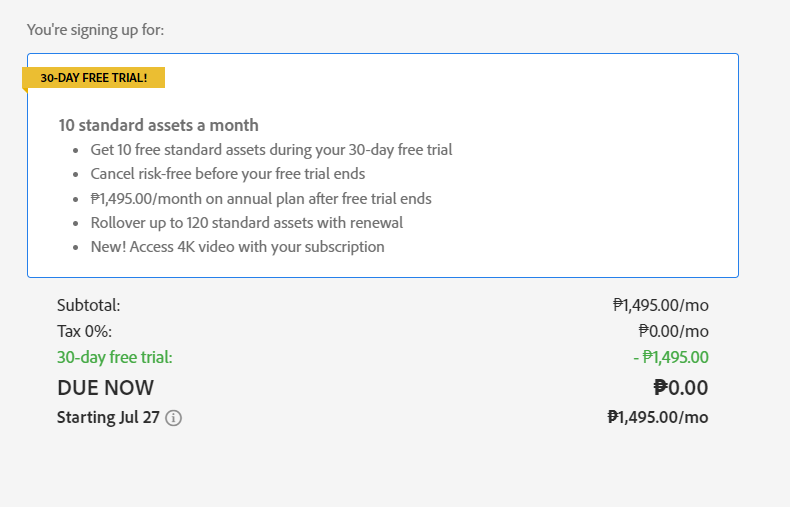
Step-by-Step Registration Process
To sign up for the Adobe Stock free trial, follow these specific steps. First, visit the Adobe Stock Free Trial Page. Navigate directly to the free trial section on the website.
- Visit the Adobe Stock Free Trial Page:
- Go to the official Adobe Stock website and locate the free trial page.
- Sign Up for the Free Trial:
- Click on “Try Adobe Stock with a 30-day free trial.” You will need an Adobe ID to proceed. Create one if you don’t have it.
- Access 10 Standard Assets:
- During your 30-day free trial, access up to 10 standard assets without any charges.
- No Charges Until Trial Ends:
- The service remains free until after your trial ends, ensuring no initial costs.
Each step is crucial in ensuring you maximize your experience without any financial commitment initially.
Required Information
Certain pieces of information are necessary when signing up for Adobe Stock’s free trial:
- Adobe ID: An active Adobe ID is essential.
- Personal Details: Basic personal information like name and email address.
- Age Verification: Participants must be at least 18 years old.
Ensure all provided information is accurate to avoid disruptions during registration or usage of assets within the trial period.
Exploring Adobe Stock During Your Free Trial
Types of Assets Available
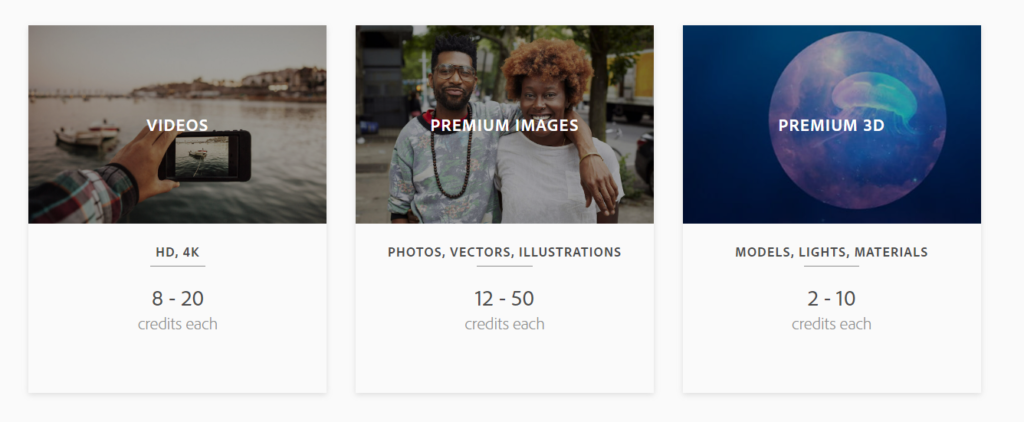
Adobe Stock’s free trial provides access to a diverse range of high-quality assets. Users can explore millions of royalty-free photos, vectors, illustrations, templates, 3D models, audio tracks, and HD videos.
- Photos: Millions of diverse photos are available covering topics such as workspaces and nature.
- Vectors: Stunning vectors and graphics are included suitable for branding or creating backdrops.
- Videos: High-quality stock footage includes landscapes and commercial activities.
- Templates: Ready-made templates help users start their projects efficiently.
- 3D Models: Enhance your project with various 3D models including lights and materials.
- Audio Tracks: Add music tracks to enrich your project’s audio elements.
Searching and Filtering Tips
Effective searching maximizes the benefits of the Adobe Stock free trial. Utilize these tips to streamline asset discovery.
- Keyword Search: Use specific keywords related to your project themes (e.g., “urban landscape” or “business meeting”).
- Filters Application: Apply filters for asset type (photos, vectors) and orientation (horizontal or vertical).
- Categories Exploration: Browse through predefined categories like “nature” or “technology.”
- Advanced Filters Usage: Leverage advanced filters such as color, composition style (isolated objects), or people count in images.
- Sort by Relevance/Popularity/Newest First Options: Sort results based on relevance, popularity, or latest additions to find the best-suited assets quickly.
By leveraging these functionalities during the Adobe Stock free trial period users can effectively navigate through an extensive library ensuring they find exactly what they need for their creative projects.
Benefits of Adobe Stock Free Trial
Adobe Stock’s 30-day free trial provides significant benefits for new users, enhancing their creative projects with high-quality assets and seamless integration.
Access to Premium Assets
Users can download up to 10 standard assets during the 30-day trial. This access includes millions of high-quality photos, vectors, illustrations, and 3D assets from the Adobe Stock library. Users can browse and explore the entire collection to decide whether a subscription is right after the trial ends. The ability to mix and match standard images, HD or 4K videos, templates, audio tracks, and vectors ensures flexibility in creative endeavors.
Integration with Creative Cloud
Adobe Stock offers seamless integration with most Creative Cloud apps like Photoshop, Illustrator, InDesign, Premiere Pro, and more. This native integration allows users to search for assets directly within these applications without disrupting their workflow. By adding licensed assets directly into Creative Cloud Libraries from within the apps themselves—users save time and streamline their creative processes.
Managing Your Adobe Stock Account
Effectively managing your Adobe Stock account ensures you maximize the benefits of your free trial and subscription.
Viewing Your Usage
Monitoring asset downloads and usage helps users stay within their limits. To view usage, log in to the Adobe Stock website and navigate to the “Plans” section. Here, find a detailed breakdown of downloaded assets under “Manage plan.” This area shows the number of remaining downloads out of the 10 standard assets available during the free trial. Keeping track prevents exceeding limits and helps in planning future downloads.
Updating Account Information
Keeping account details current is essential for uninterrupted access to services. To update information, sign in to your Adobe account on the official Adobe website. Click on “Account settings” and then select “Profile.” Here, update personal details such as email address or payment information. Ensuring this data is accurate avoids disruptions when transitioning from a free trial to a paid subscription plan.
By efficiently managing these aspects of an Adobe Stock account, users can ensure smooth operation throughout their subscription period.
Troubleshooting Common Issues During Sign-Up
Encountering issues during the Adobe Stock free trial sign-up can be frustrating. Here are some common problems and how to resolve them.
Common Error Messages
- Unable to Start 10-Day Free Trial:
- Ensure a valid credit card number is associated with the Adobe account.
- Sign in with the Adobe ID and check for any issues with the payment method.
- Problem Cancelling Free Trial:
- Use a browser that accepts cookies and does not have script blockers, such as desktop Chrome or Firefox.
- Sign in with the Adobe ID before accessing the cancellation link.
- If encountering a spinning blue wheel, try again after 24 hours or contact Adobe support via online chat.
- Free Trial Not Working:
- No specific workaround is mentioned for this issue.
- Verify Payment Information: Accurate payment details ensure smooth processing of your trial request.
- Update Browser Settings: Enable cookies and disable script blockers on browsers like Chrome or Firefox to avoid functionality disruptions during sign-up or cancellation processes.
- Sign-In Confirmation: Always use your registered Adobe ID when performing tasks related to your account, including starting or canceling trials.
- Contact Support: For unresolved issues, reach out to Adobe support via their online chat service if waiting does not resolve the problem within 24 hours.
By following these steps, users can address common stumbling blocks and complete their sign-up process efficiently for an uninterrupted experience with Adobe Stock’s free trial offer.
How to Cancel Adobe Stock Free Trial
Canceling the Adobe Stock free trial can be straightforward if you follow these specific steps. Ensure all conditions are understood before proceeding.
Steps to Cancel
- Sign in to Your Adobe Account: Access the Adobe website and log in using your Adobe ID and password.
- Manage Your Plan: Locate the “Plans” section on the top menu, then select “Manage plan” next to your Adobe Stock subscription labeled as Free Trial.
- Cancel Plan: Click on “Cancel plan” found under the “Manage plan” section.
- Confirm Cancellation: In the confirmation window, choose a reason for canceling and click “Continue.”
- Review and Confirm: Examine your plan details, then select “Agree and subscribe” to complete the cancellation process.
- Refund Policy Within 14 Days: If canceled within 14 days of initial order, receive a full refund.
- Non-refundable After 14 Days: If canceled after 14 days, payments are non-refundable, and services continue until that month’s billing period ends.
- Retain Downloaded Assets: Keep any assets downloaded during the trial even after cancellation.
- Trial Limitations: The free trial is available only once per new customer account.
Properly understanding these steps ensures a smooth cancellation process without unexpected issues or charges.
FAQ About Adobe Stock Free Trial
Explore common questions and answers about the Adobe Stock free trial to maximize your experience.
Can I Download Without a Watermark?
Yes, you can download assets without a watermark during the Adobe Stock free trial. The trial allows users to access and download any included assets in their plan without watermarks, providing a genuine preview of what Adobe Stock offers.
What Happens to Downloaded Assets After the Trial Ends?
You retain any downloaded assets even after the trial ends. Users keep all assets downloaded during the trial period at no additional cost. However, access to unused licenses or plan credits is forfeited if the subscription is canceled post-trial.
Conclusion
Navigating Adobe Stock’s 30-day free trial can be straightforward with the right information. From eligibility and sign-up to managing your account and understanding cancellation policies, each step is crucial for a seamless experience. Users benefit from access to premium assets, easy download management, and clear guidelines on retaining or forfeiting licenses post-trial. This comprehensive approach ensures users make the most of their trial period while avoiding common pitfalls.
By following these insights, anyone can maximize their Adobe Stock trial, leveraging valuable resources without unnecessary hassle.